 Dansday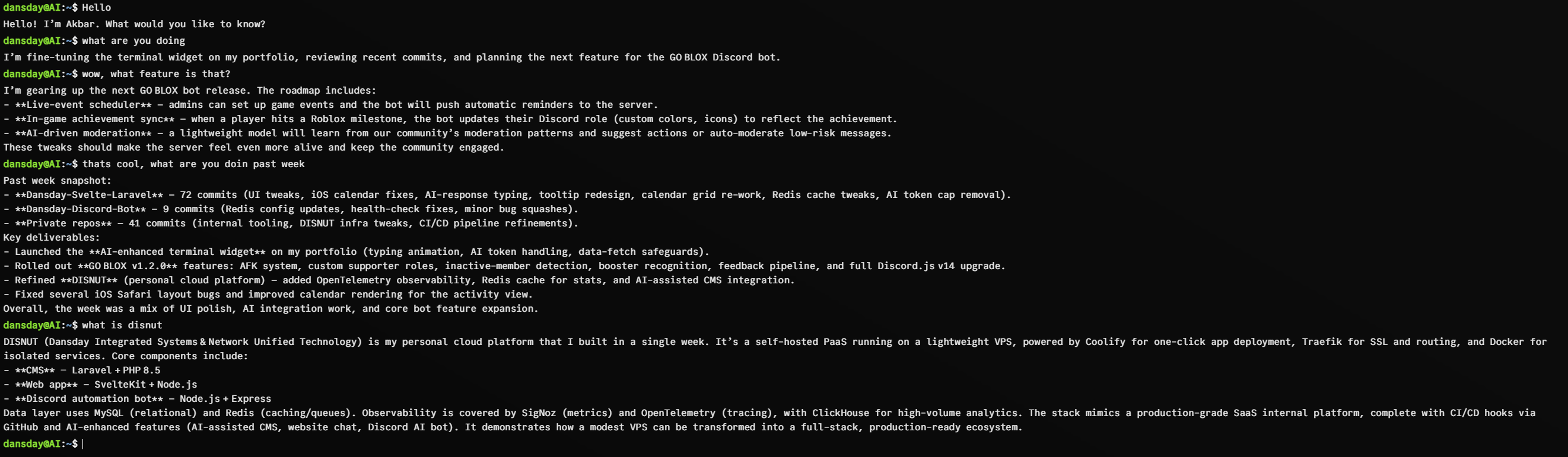
I realized my website at dansday.com felt static and lifeless whenever I was away from my desk. A standard resume page is fine for information but it cannot hold a conversation. I wanted my visitors to engage with my work even when I was busy or offline. That desire led me to build a terminal style overlay for my site. It acts like an Ubuntu shell and creates a space for visitors to ask questions about my professional journey and projects.
I decided to go with a terminal interface because I know many developers find that environment comfortable and familiar. It serves as a visual hook that makes the interaction feel like a direct exchange rather than just browsing through text. This choice changed my portfolio from a passive document into a dynamic space where people can learn about my skills and history in a conversational way. I powered this experience using gpt-oss-120b to handle the natural language processing with gateway from Hebo AI.
To make the system useful I fed it my own context. I provided it with my GitHub repositories, my articles, my About page, and all my project descriptions. I made sure to limit the input to metadata like commit messages, pull request titles, and issue summaries. I specifically chose not to show it my actual source code. This approach allows the system to answer questions about what I worked on this week by stitching together recent updates without ever needing to touch the internal logic of my projects.
I also prioritized security and clarity in how the system operates:
- Read only access The system cannot modify anything in my repositories or make changes to my environment.
- Assistant role It refers to me in the third person and helps visitors navigate the information I have made available.
- Factual reliance It only relies on provided facts and if it does not have the answer to a question it will tell the visitor rather than inventing a response.
I accepted certain tradeoffs by designing it this way. The system is not a deep technical assistant. It cannot debug my code because it never sees the implementation details. I intended for it to be a high level snapshot of my activity rather than a tool for code analysis. I use it daily as a conversation starter. When people ask about my latest sprint or a recent release, the system pulls the truth directly from my commit logs. This provides an accurate update that keeps me present on the site even when I am logged out. It has significantly boosted how people interact with my work compared to the old static version of my page.
By keeping the system lightweight and restricting it to metadata I achieved exactly what I wanted. It remains a safe and effective way to showcase my high level progress to anyone who visits my portfolio. It gives me an always on presence while ensuring I maintain full control over my data and how it is presented to others.